How to save your Mealime recipes before the shutdown (there is no export button)
Mealime shuts down on 21 October 2026 and has no export feature. Here is exactly what you can still save — recipes, meal plans, settings — how to do it in 20 minutes, and where to rebuild your week afterwards.
The short version
- Mealime has no export: no CSV, no PDF, no email backup. Anything you don't save manually is deleted when the app shuts down on 21 October 2026.
- The fastest method is screenshots: open each favourite recipe, capture the ingredient list and the steps, and drop them into one photo album called “Mealime”.
- Your settings matter more than your recipes: diets, allergies, dislikes and household size take a minute to write down and make switching to a new planner nearly instant.
- After saving, the most direct replacement is Cestio: it plans 21 meals a week with AI around your budget, diet and supermarket, writes an aisle-sorted grocery list and shares it with your household — free for 3 days.
Mealime shuts down on October 21st, 2026, and its closing notice does not add an export feature — there has never been one. Whatever you want to keep, you have to save yourself, by hand, before the deadline. The good news: done in the right order, it takes about 20 minutes.
What you can and cannot save
| Data | Can you save it? |
|---|---|
| Favourite recipes | Yes — manually (screenshots or copy-paste) |
| Current meal plan | Yes — manually |
| Grocery lists | Yes — manually, but they expire with the plan anyway |
| Diets, allergies, dislikes, household size | Yes — write them down, takes a minute |
| Account history and personal data | No — deleted at shutdown |
| Automatic export or transfer to another app | No — the feature does not exist |
Step 1: screenshot your favourite recipes (10 minutes)
- Open Favourites and go recipe by recipe.
- Capture two screenshots per recipe: the ingredient list and the preparation steps.
- On iPhone, long recipes fit in one capture with full-page screenshot (take a screenshot, tap the preview, choose “Full Page” and save as PDF).
- Put everything in one photo album called Mealime so it never gets lost in your camera roll.
Step 2: write down your settings (1 minute)
This is the step people skip, and it is the one that actually makes switching painless. In your notes app, write four lines: your diets, your allergies, the ingredients you refuse to eat, and how many people you cook for. Every meal planner asks for exactly these four things during setup.
Step 3: check your Pro subscription (30 seconds)
Mealime Pro is free for everyone until the shutdown and existing subscriptions will not renew, so there should be nothing to cancel. Still, open your App Store or Google Play subscriptions once and confirm Mealime shows no upcoming charge.
Step 4: rebuild your week somewhere new
If Mealime's job in your life was “decide the week's meals and hand me one grocery list”, Cestio is the most direct replacement — and the four lines you wrote down in step 2 are its entire setup:
- 21 meals a week planned by AI around your budget, diets, allergies, cooking time and appliances.
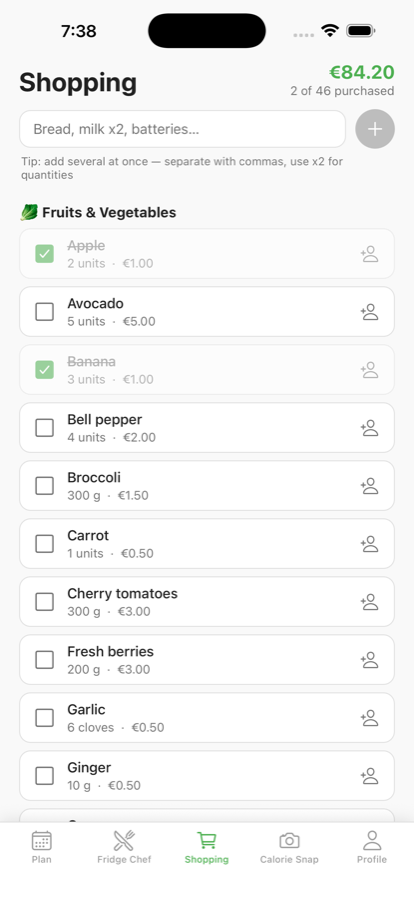
- One grocery list grouped by aisle with an estimated total, built for your actual supermarket.
- Shared with your household in real time, with items you can assign to a person.
- Calories and macros on every meal, plus Fridge Chef (photo of your fridge → instant recipes).
- Free to download, every feature free for 3 days, then $4.99/week or $39.99/year ( €2.99/week or €19.99/year in Europe).
Full background on the closure is in Is Mealime shutting down?, and a comparison of replacements in the best Mealime alternatives.
Frequently asked questions
- Can I export my recipes from Mealime?
- No. Mealime has never had an export feature and the closing notice does not add one. Screenshots or copy-paste before 21 October 2026 are the only way to keep your recipes.
- Can another app import my Mealime data?
- No app can import Mealime data automatically, because there is nothing to import from. The practical route is to re-enter your diets, allergies, dislikes and household size in a new planner — about a minute of typing.
- Will Mealime charge me after the shutdown?
- No. Pro is free for everyone until 21 October 2026 and subscriptions will not renew. Checking your App Store or Google Play subscriptions once is still a sensible precaution.
- What happens if I do nothing before October 21?
- The app stops working and your account data, including saved recipes and plans, is deleted. There is no grace period or archive to request afterwards.