How to use an AI meal planner with a shopping list
Turn a weekly food budget, your schedule and your food preferences into a meal plan you can actually shop for. A practical guide with a worked example.
The short version
- An AI meal planner turns your preferences into suggested meals and recipes. A planner with an integrated shopping list also combines the ingredients, so you can move from choosing meals to buying groceries.
- Give the planner your household size, days and meals to cover, budget, supermarket, dietary preferences, cooking time and appliances. Review quantities and pantry items before shopping.
- Cestio combines weekly meal plans, recipes and a shared shopping list. It supports 13 languages, including Dutch, Polish, Romanian, Norwegian Bokmål, Danish and Swedish. Prices and nutrition figures are estimates.
What should an AI meal planner do?
A useful AI meal planner connects three tasks: deciding what to eat, explaining how to cook it and listing what to buy. A week of recipe names alone still leaves the ingredient calculations and shopping to you. Look for editable meals, household portions and a consolidated list you can share.
What information should you give it?
- People and meals: how many people, which days, and whether you need breakfast, lunch, dinner or a combination.
- Budget and store: the amount available for the meals covered and where you normally shop. Leave room for non-food items if they share that budget.
- Food preferences: dietary requirements, allergies, disliked ingredients and meals your household will eat.
- Time and equipment: the cooking time you can manage and the appliances you own.
A worked example: five dinners for two
Suppose two adults want five vegetarian dinners, have a €50 budget for those dinners, shop at Lidl and can cook for up to 30 minutes using a hob and microwave. This is an illustrative brief, not a priced menu or a promise that a particular basket will cost €50.
- Set the household size to two and select dinner on five days. Add the budget, shop, vegetarian preference, time limit and available appliances.
- Review the generated recipes. Check portions, cooking time and whether each meal suits both people. Swap a meal you do not want.
- Open the combined shopping list. Check the cupboard, fridge and freezer, and remove or reduce ingredients you already own.
- Check package sizes and shelf prices in the store. Adjust the basket if it exceeds your budget, then share the list with the other shopper.
What can Cestio automate?
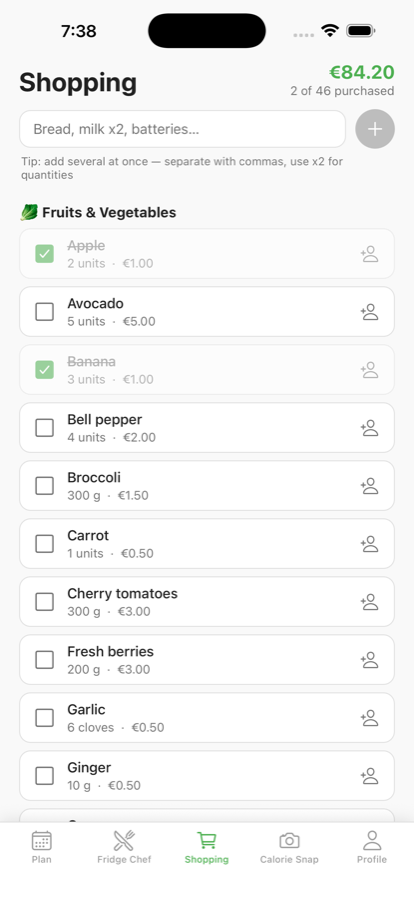
Cestio generates weekly meal plans with recipes, cooking time and nutrition estimates, then combines the ingredients into a shopping list grouped by supermarket section. Household members can share the list and assign items. You can swap one meal without replacing the whole week. Fridge Chef suggests recipes from a photo of ingredients you have; it is a separate way to decide what to cook tonight.
What should you check yourself?
An estimated shopping total is not a store quotation. Package sizes, promotions and local prices can change the amount you pay. Nutrition values are estimates too. If you have an allergy, check every ingredient and product label yourself. An AI plan does not replace advice from a qualified professional for a medical diet.
Cestio supports English, Spanish, French, Portuguese, German, Italian, Greek, Dutch, Polish, Romanian, Norwegian Bokmål, Danish and Swedish. For a more detailed budgeting method, read our weekly grocery budget guide.
Frequently asked questions
- Can AI create a weekly meal plan and grocery list?
- Yes. A meal planning app such as Cestio can generate meals and recipes from your preferences and combine the ingredients into a shopping list. Review the recipes, quantities and pantry items before buying.
- Does an AI meal planner know live supermarket prices?
- Do not assume it does. Cestio shows estimated grocery costs, not a live quotation from your supermarket. Check shelf prices and package sizes before paying.
- Can my family share the shopping list?
- Yes. Cestio lets household members share a shopping list and assign items to each other.
- Does Cestio support the new languages?
- Cestio supports 13 languages, including Dutch, Polish, Romanian, Norwegian Bokmål, Danish and Swedish, with localised recipes and shopping lists.